Why negative keywords are budget control
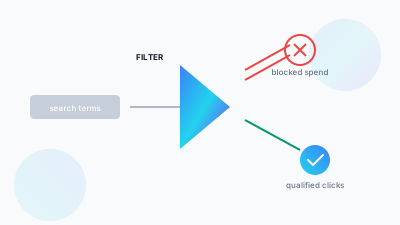
Many sellers treat negative keywords as cleaning: something done once a month, when someone remembers, to tidy a search term report that has started to look embarrassing. That gets the job wrong. Negatives decide where your budget is allowed to go in the first place. Accounts with disciplined negative keyword habits spend less on junk clicks, and they also put noticeably more of their budget behind search terms that were already converting, because every dollar not wasted on an irrelevant click can go into a higher bid on a proven one.
In accounts we audit that have never had a structured negative keyword process, it is common to find a fifth or more of total ad spend going to search terms that never converted and, looking at them, never would have. The intent was wrong, the product category was wrong, or a modifier ("free," "used," "diy," "replacement parts") marked a shopper who was never going to buy your exact product.
The two negative match types (and the one that doesn't exist)
Amazon supports exactly two negative match types: negative exact and negative phrase. There is no negative broad match, which catches out sellers who come from ad platforms where broad negatives exist. Knowing exactly what each type blocks is what separates a negative list that protects spend from one that quietly suppresses converting traffic.
Negative exact: precise, with no side effects
Negative exact blocks only the exact search term you enter, character for character. Add "phone case" as a negative exact and it blocks searches for exactly "phone case", but not "phone case blue" or "iphone phone case". It is the safest negative type because it affects one search term and nothing else.
Use it for search terms you have confirmed convert poorly. Use it too as part of the tier-flow discipline covered in our campaign structure guide: when a term proves profitable in a broad or phrase campaign, add it as an exact match keyword in a dedicated conversion campaign and, at the same time, add it as a negative exact in the broad campaign. That stops your own campaigns bidding against each other for the same term.
Negative phrase: powerful, and easy to overuse
Negative phrase blocks any search that contains the phrase, whatever words surround it. Adding "cheap" as a negative phrase blocks "cheap coffee maker", "coffee maker cheap" and every other search containing that word, in one move. That makes it very efficient for shutting out whole categories of irrelevant intent without listing every variation. The same reach makes it easy to suppress a converting long-tail search by accident, hidden inside a phrase you blocked for some unrelated reason.
A supplement brand had added "kids" as a negative phrase to keep pediatric traffic off an adult product. That one negative was also blocking "kids of all ages", a phrase inside a converting long-tail search for a family-oriented gift bundle. Avoiding negative phrase would not have helped. Reviewing what you have already blocked, on a schedule, would have caught it.
Negative product and brand targets
Keywords are only half of what your ads match against. Automatic campaigns and product targeting campaigns also show your ads on other products' detail pages, and some of those placements waste money in the same way irrelevant searches do. For those, use negative product targeting: you can exclude specific ASINs from a campaign or ad group, and in some campaign types whole brands as well.
Check the targeting report for your auto and product targeting campaigns alongside the search term report. Typical candidates are your own ASINs that you do not want to advertise against, accessories or spare parts that attract clicks but sell for a fraction of your price, and competitor products whose shoppers never buy yours. Apply the same evidence threshold as for keywords before you exclude anything.
Campaign-level vs. account-level negative lists
You can apply negatives to an individual campaign. For terms that should never generate traffic anywhere in your account, you can also keep a shared negative list that applies across every campaign automatically, including new ones as you launch them. Put permanently irrelevant terms on the account-level list: competitor brand names you are not targeting on purpose, product categories you don't sell, and obvious mismatches. Keep campaign-level negatives for tier-flow work and for terms that are relevant in one campaign's context but not another's.
Without an account-level list, sellers end up re-adding the same handful of obvious negatives to every new campaign they launch, indefinitely, instead of setting the boundary once.
The weekly harvesting workflow
Negative keyword management works best as a standing weekly habit. Pull the search term report each week and apply a simple threshold rule. Flag any search term with a meaningful number of clicks and no conversions, where spend has already passed roughly your target cost per acquisition for that product without a sale. Terms that clear that bar get a negative exact straight away. Terms that show a pattern of irrelevant intent (wrong product type, wrong price tier, an obviously mismatched modifier) get assessed for negative phrase instead.
To pull the report, go to the Amazon Ads console, open Sponsored ads reports, create a Sponsored Products report and choose the search term report type. Set it to the last 30 to 60 days so slow-converting terms have had a chance, then sort by spend.
The same session is when you harvest in the other direction. Search terms performing well in a discovery or research campaign get promoted into a dedicated exact match conversion campaign, with a matching negative exact added back in the source campaign, which closes the loop described above.
A worked example of the threshold rule
Take an illustrative product priced at $24.99 where you are happy to pay up to $8 in ad spend to win a sale. A search term appears in your report with 14 clicks, $9.10 spent and no orders. It has passed your target cost per acquisition with nothing to show, so it gets a negative exact this week.
A second term has 4 clicks, $2.60 spent and no orders. It has not earned a verdict yet. Leave it, and look again next week.
A third term, "replacement lid for [your product type]", has 9 clicks, $5.80 spent and no orders, and the modifier tells you why: the shopper wants a part, not the whole product. That pattern justifies a negative phrase on "replacement lid", because every search containing it carries the same mismatched intent.
To judge how many clicks is enough, use your own conversion rate. If a product converts at around 10% of clicks (again an illustrative figure), the chance of 20 clicks in a row producing no sale is roughly 12% even when the term is a reasonable one. At 30 clicks it falls to about 4%. So for that product, 20 to 30 clicks without a sale is a reasonable point to act. A product that converts at 5% needs about twice as many clicks before you can tell the same thing.
The over-blocking trap
Under-management is not the most common negative keyword mistake. Over-management is: someone anxious about wasted spend starts adding negative phrases broadly on thin data. A search term with two clicks and no conversions has not told you anything yet; it is noise. Give each term a fair sample before you judge it. A reasonable rule is to wait for enough clicks to support a conclusion at your price point and in your category, as in the example above, rather than an arbitrary number that applies to everyone. Audit your negative lists once a quarter, looking specifically for phrase negatives that may be catching more than intended, not just adding new ones.
A quick way to run that audit is to take each negative phrase and search your last 90 days of search term data for any query containing it that also had orders before the negative went in. If a blocked phrase appears inside converting searches, narrow it to a negative exact on the specific bad terms instead.
Building your starter negative list
For most physical product categories, a sensible starting account-level negative list covers four groups. The first is intent-mismatch modifiers such as "free," "cheap," "used," "refurbished," "wholesale" and "bulk", unless any of them truly describes your offer. The second is DIY or instructional intent, if you sell a finished product rather than parts or materials. The third is job and career search terms, which occasionally leak in on queries close to a brand name. The fourth is any competitor brand names you have decided not to target. Beyond that starter set, build the list from your own search term data instead of copying a generic template, because what is irrelevant in one category is core converting traffic in another.
Common mistakes to check for
- Adding the same term as a negative and as a positive keyword in the same ad group, then wondering why it never serves.
- Using negative phrase on a single common word, such as a color or size, that also appears in your best converting searches.
- Negating your own brand name in a non-brand campaign without making sure a branded campaign is running to catch those searches.
- Judging terms over a 7-day window when your product's buyers often take longer to decide, so the report shows clicks but not yet the orders that follow.
- Never removing negatives. Seasonal terms that were wrong in March can be right in November.
What good negative keyword habits save you
The wasted spend you stop losing is only part of the value. The rest is what the reclaimed budget lets you do. Every dollar no longer spent on an irrelevant search can go behind a higher bid on a term you know converts, and that compounds. Tight negative management lowers blended ACoS by moving the same spend toward proven performance, without cutting the budget. That is the case for doing this every week instead of once a quarter.
Frequently Asked Questions
No. Amazon supports exactly two negative match types: negative exact and negative phrase. This catches out sellers coming from ad platforms where broad negatives exist. Negative exact blocks only that one search term, character for character. Negative phrase blocks any search containing the phrase, wherever it sits in the query.
Weekly, as a standing habit rather than a monthly tidy-up. Pull the search term report each week and add a negative exact for any term with meaningful clicks, zero conversions, and spend already past your target cost per acquisition for that product. Terms that show a pattern of irrelevant intent get assessed for negative phrase instead.
It can, and over-blocking on thin data is the more common mistake. In one audit, a supplement brand had added 'kids' as a negative phrase to avoid pediatric traffic, which also blocked 'kids of all ages' inside a converting long-tail search. Two clicks with no conversions is noise, not evidence. Audit what you've blocked every quarter, not just what you're adding.
Put permanently irrelevant terms on a shared account-level list so they apply automatically across every campaign, including ones you launch later. That covers competitor brands you aren't deliberately targeting, categories you don't sell, and obvious mismatches. Keep campaign-level negatives for tier-flow work and for terms that are relevant in one campaign's context but not another's.
Negative keywords are search terms you block so your Amazon ads stop serving against them. They remove reach instead of adding it. Amazon offers two types, negative exact and negative phrase, applied at campaign or ad group level to stop spend leaking into searches that were never going to convert.
Open the campaign in the advertising console, select the ad group, then use the negative keywords tab to add terms as negative exact or negative phrase. Most sellers take them from the search term report: sort by spend, find terms with clicks and no conversions, and block those. Campaign-level negatives apply to every ad group inside that campaign.
Yes. In automatic and product targeting campaigns you can add negative product targets, excluding specific ASINs (and, in some campaign types, whole brands) from a campaign or ad group. Use the targeting report to find product placements that take clicks without orders, and apply the same evidence threshold you use for keywords before excluding them.