Know exactly why your Amazon numbers moved.
Profit, inventory, advertising, automated reporting and rule-based ads automation in one command center for Amazon sellers and agencies, with an AI assistant that explains every change before your client asks.
No CSV uploads 13 Amazon marketplaces Set up in 10 minutes Approval before every change
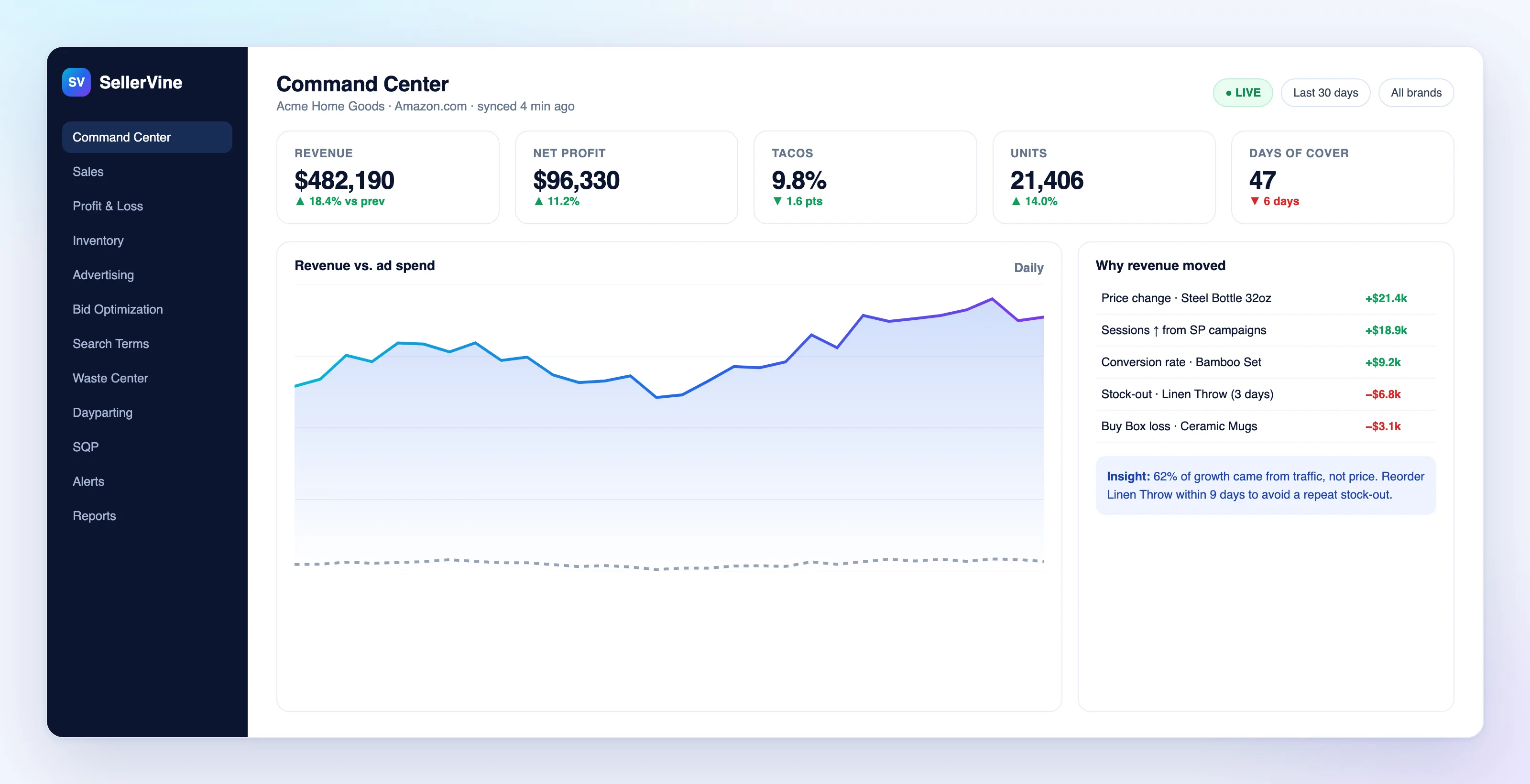
Screenshots use sample data from fictional brands.
- Amazon marketplaces
- 13
- Report sections
- 15
- Strategy presets
- 10
- Metrics in custom rules
- 13
Amazon gives you data. Not answers.
Most sellers run the business from exports, three tabs of formulas and a gut feeling. SellerVine replaces that with one source of truth.
Spreadsheets lie by Tuesday.
Live data synced from Amazon several times a day, so Monday's export is never your source of truth again.
Revenue is up, profit is down.
True profit after Amazon fees, COGS, advertising, returns and reimbursements, per product and per brand.
Ad spend leaks quietly.
Search terms that spend without selling are flagged daily and negated before they add up.
Nine modules. One source of truth.
Everything an Amazon brand or agency checks in a week, connected to the same data, so every team reads the same numbers.
Sales
- Revenue, units and orders by day, ASIN and marketplace
- Sessions, page views and conversion rate
- Period and year-over-year comparison
- Subscribe & Save performance
Profit
- Net profit after fees, COGS, ads, returns and reimbursements
- Profit and loss waterfall
- Profit and margin per ASIN
- Profitability matrix and leaderboards
Inventory
- Days of cover per SKU
- Stockout prediction
- Reorder dates from velocity and lead time
- Overstock and aged-stock warnings
Advertising
- Campaign, product and search-term views
- Sponsored Products, Sponsored Brands and Sponsored Display data
- Spend plan and budget pacing
- ACoS, TACoS and ROAS on one definition
Search terms
- Waste Center for zero-sale spend
- Harvest, isolate, negate, protect or monitor
- Search Query Performance share
- Brand terms and own ASINs protected
Automation
- Bid rules against target ACoS
- Custom multi-metric rules and rule sets
- Dayparting and budget rules
- Hourly, daily or weekly schedules
Reporting
- 15 sections, PDF, Excel and CSV
- Scheduled email delivery
- White-label reports and client portal
- Monthly business reviews
Alerts
- Stockout risk and Buy Box loss
- ACoS surge and ads bleeders
- Search-query leaks
- Anomalies against same-weekday history
AI assistant
- Ask questions in plain English
- "Why it moved" explanations
- Rule drafts from a sentence
- Claude, OpenAI or Gemini
Every number an Amazon operator needs, in one place.
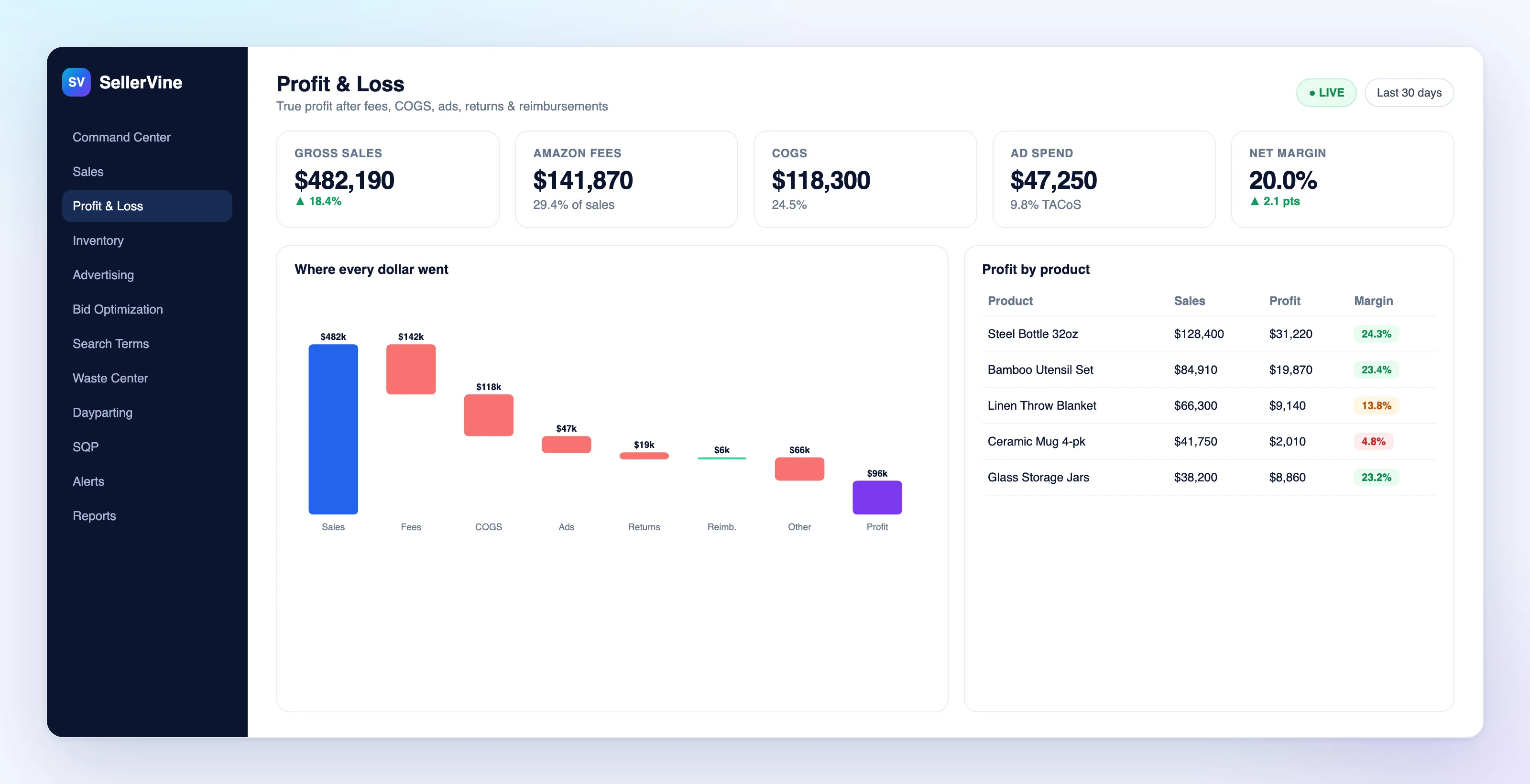
See where every dollar went.
Revenue is only the starting line. SellerVine walks it down to net profit so you can see which costs moved and which products actually pay the bills.
- Fees, COGS, ads, returns and reimbursements in one waterfall
- Profit and margin per product
- COGS entered once or uploaded in bulk, effective-dated
Reorder before you run out, not after.
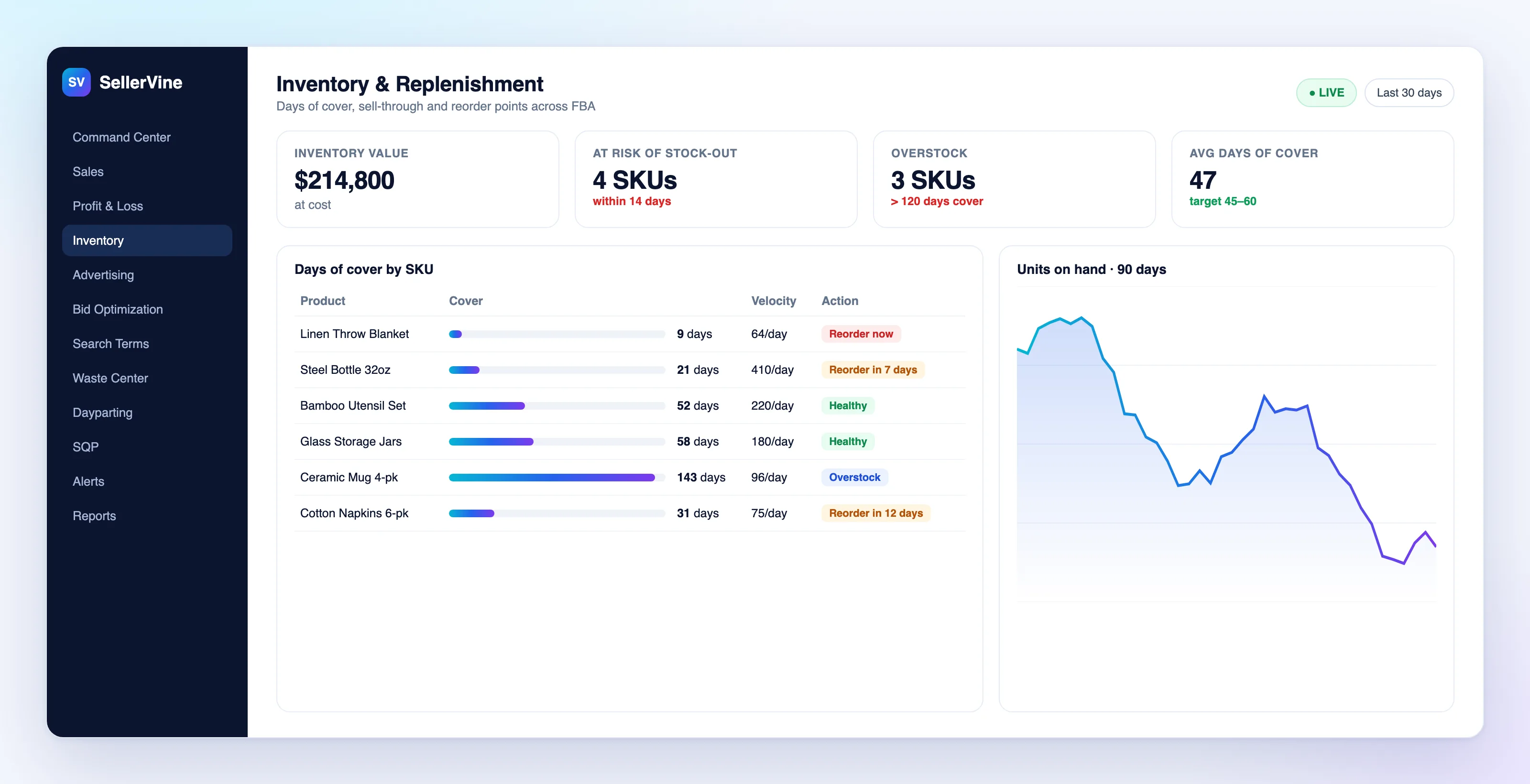
Stock-outs cost rank as well as sales. SellerVine turns real sales velocity and your supplier lead times into reorder dates you can act on.
- Days of cover per SKU
- Reorder dates from real velocity and lead time
- Overstock and aged-stock warnings
Bid changes you approve, not guess.
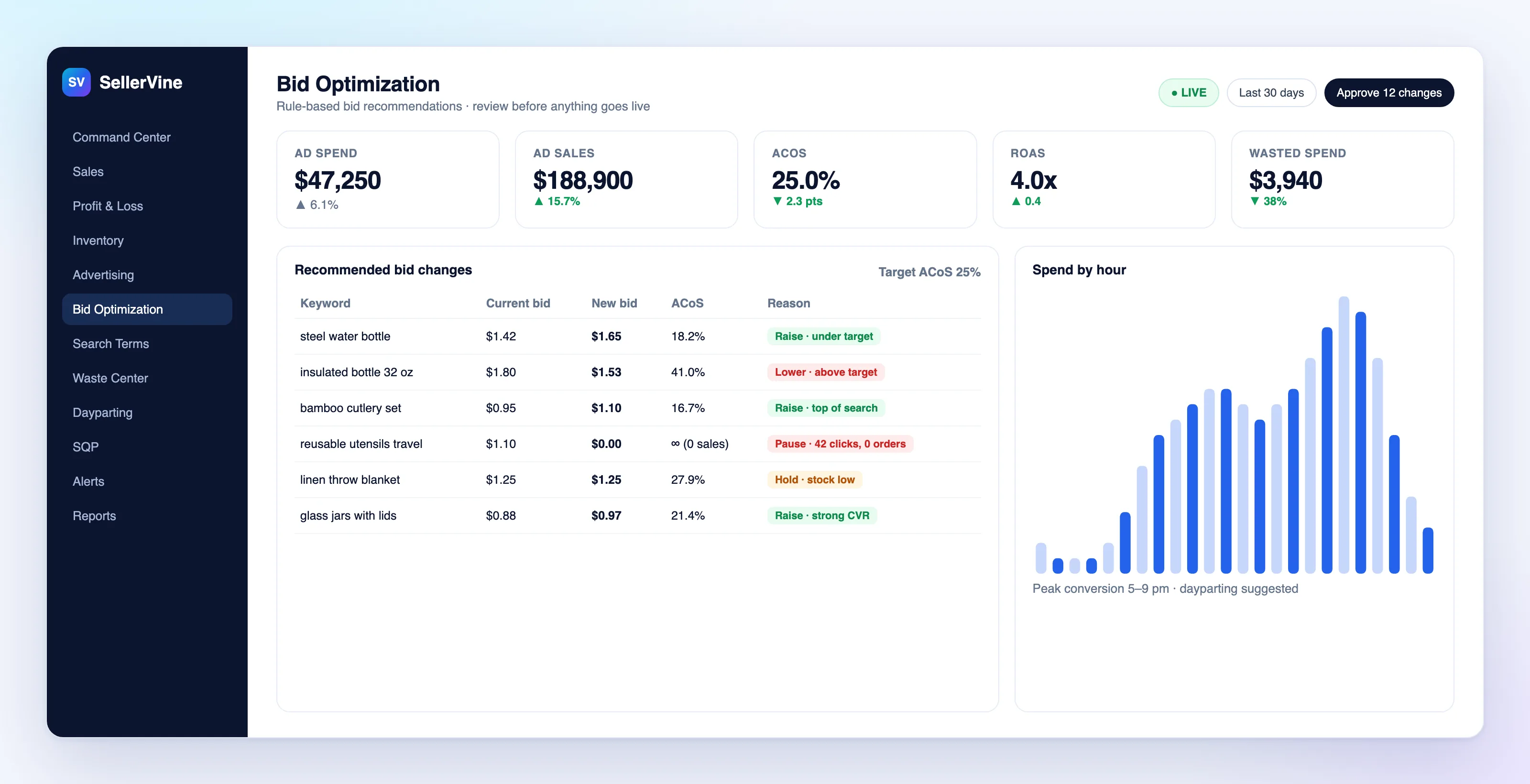
SellerVine compares every Sponsored Products target against your target ACoS and recommends a new bid with the reason attached. You review the list and approve what you agree with.
- Rule-based bid recommendations against your target ACoS
- Custom rules, rule sets and ten objective presets
- Nothing goes live until you approve it
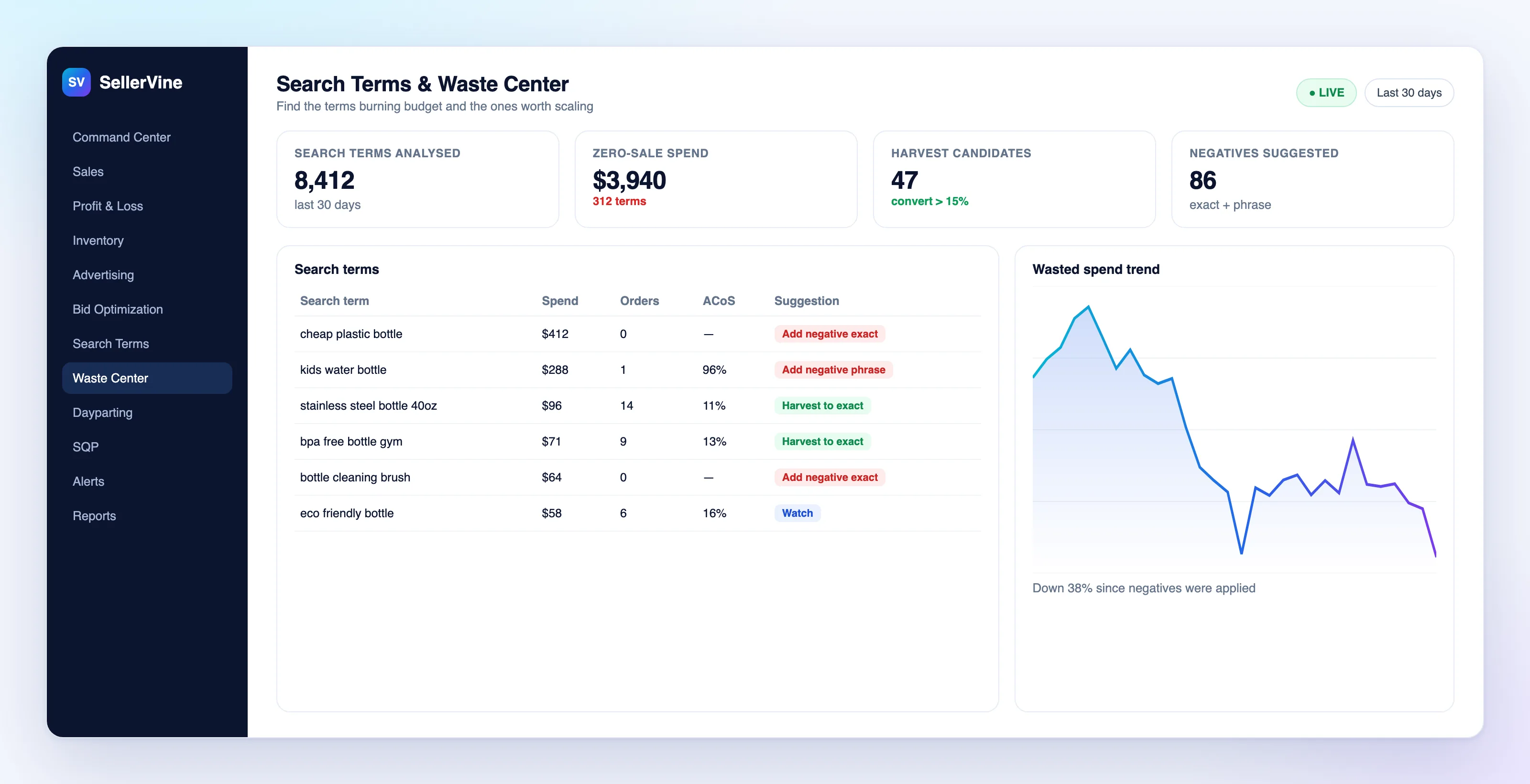
Stop paying for clicks that never convert.
Zero-sale search terms are easy to miss when they cost a few dollars a day. SellerVine collects them in one place, recommends negatives, and flags winners to harvest into exact match.
- Zero-sale spend surfaced daily
- One-click negatives, exact and phrase, with brand terms protected
- Harvest winning terms into exact-match campaigns
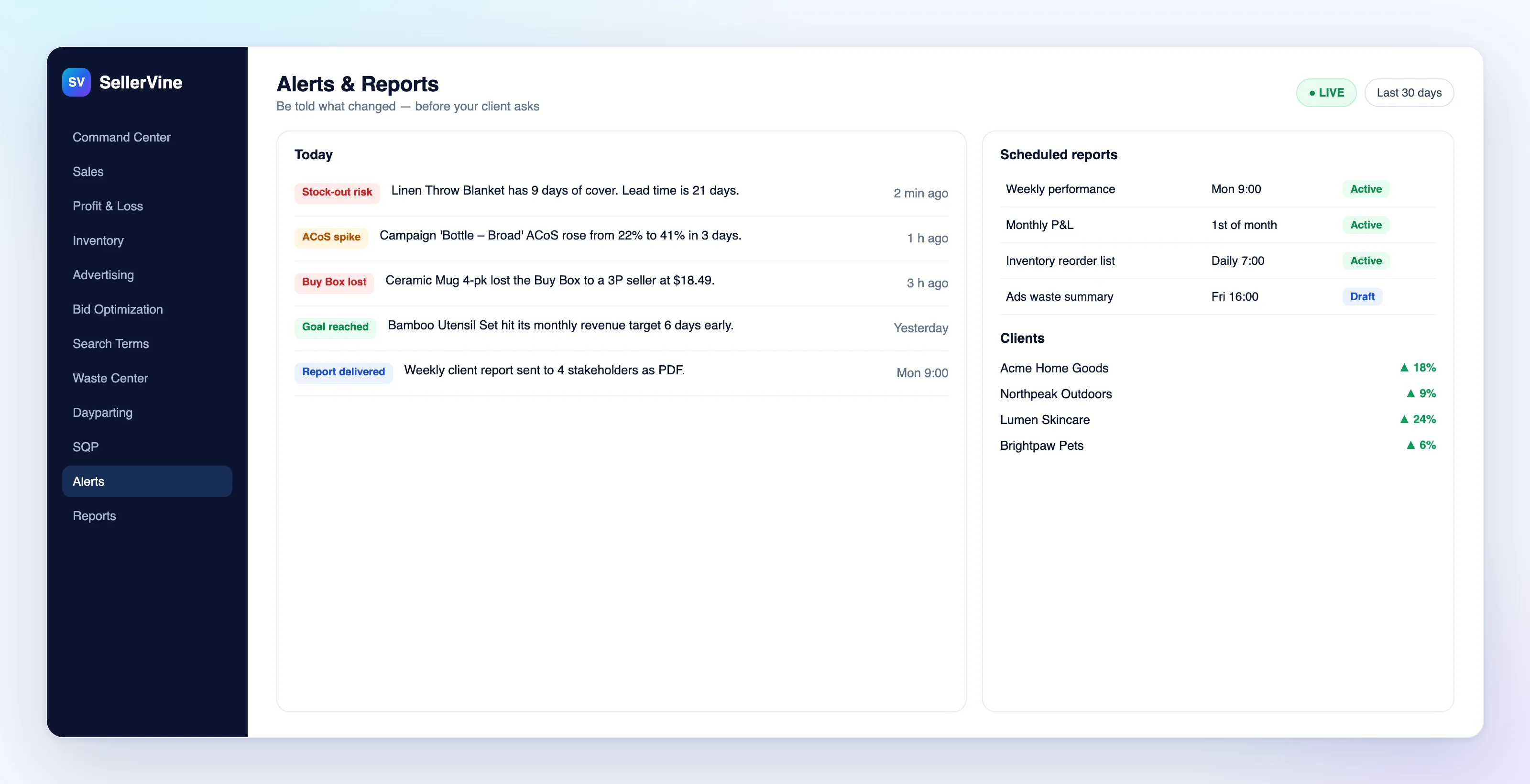
Hear about it before your client does.
Stockout risk, ACoS surges and lost Buy Boxes are flagged in the app after every data sync. Reports go out by email on schedule without anyone building them.
- Stockout, ACoS surge, Buy Box and ads-bleeder alerts
- Scheduled PDF, Excel and CSV reports per client
- Anomaly flags against same-weekday history
Not just what changed. Why.
Dashboards tell you revenue went up. SellerVine breaks the change into its causes: price, traffic, conversion, stock and Buy Box, product by product, so the next decision is obvious.
Sample breakdown for a fictional brand
Computed from your data first. AI only puts it into words; it never invents a number.
Client-ready reports that build and send themselves.
Pick the sections, the period and the recipients once. SellerVine assembles the report from live data and emails it on schedule, so Monday morning starts with answers, not exports.
15 report sections, mix and match
Build one report for the founder and another for the ads team from the same data.
- Executive Summary
- Sales & Traffic
- Advertising Overview
- Campaigns
- Placements & Match Types
- Search Terms
- Keywords & Targets
- Advertised Products
- Profitability
- Product Contribution
- Inventory
- Search Query Performance
- Subscribe & Save
- Optimization Activity
- Alerts
Scheduled, shared and branded
Reports go out on time, in the format each reader wants.
- PDF, Excel (XLSX) and CSV, emailed as attachments
- Daily, weekly or monthly, at the hour and time zone you choose
- Last 7 to 90 days, month to date, last month, year to date or custom, compared with the previous period or last year
- Share links that expire, can be revoked and show how often they were viewed
- Your company name and brand color on every report
Your PPC playbook, written as rules that run on schedule.
Set the goal and the guardrails once. SellerVine checks every Sponsored Products target against them on a schedule and hands you a reviewed list of changes, with the reason for each one.
Bid optimization profiles
Rules act only when the data is strong enough to trust.
- Target ACoS, minimum clicks, spend and orders before any rule acts
- Minimum and maximum bids, and a cap on the size of any single change
- Built-in rules for zero-order waste, ACoS above target and strong performers
- Change size scaled by confidence, a cool-down after each change, and the newest two days skipped while attribution settles
- Protected campaigns and targets the rules never touch
Custom rules and rule sets
Write the rules your team already follows, then apply them where they belong.
- If, and, or conditions across 13 metrics
- Actions: pause, raise or lower by a percentage, or set an exact bid
- Rule sets scoped to account, portfolio, ASIN or campaign, with the most specific one winning
- Runs hourly, daily, weekly or on a custom schedule, on the weekdays you choose
- Budget rule for campaigns that keep running out, up to a maximum you set
Start from an objective, not a blank page
Ten presets set sensible targets and rules for the job each campaign is doing. Adjust any of them.
- Profitability
- Growth
- Ranking
- Launch
- Discovery
- Brand Defense
- Defensive
- Competitor
- Clearance
- Seasonal
Stack rules by lookback window
Short windows react fast; long windows clean up slowly building waste. Run them together on the same campaigns.
If
- Clicks ≥ 15 and orders = 0
- ACoS above target by 10%+
Then
- Lower bid 15%
- Pause after 30 clicks with no order
If
- ACoS below target, 3+ orders
- Conversion rate above account average
Then
- Raise bid up to the cap
- Harvest the search term to exact match
If
- Spend with no sales over 90 days
- Impressions but no clicks
Then
- Add a negative exact
- Pause the target
Example rules. Build your own with any of 13 metrics.
The rule library
Preview every change before it goes live.
You see what each rule wants to change, why, and by how much, before anything happens. Approve in bulk or one by one, and check the log afterwards.
- RecommendRules and the search-term engine propose changes, each with its reason.
- ApproveYou accept or reject each recommendation.
- ValidateThe change plan runs through more than 16 safety checks.
- PreflightCurrent values are read live from Amazon, so nothing is based on stale data.
- ConfirmA typed confirmation before anything is written.
- ExecuteChanges are applied within hard caps on size and count.
- VerifyEach change is read back from Amazon to confirm it landed.
- LogWho changed what, when and why, in a full audit log.
Ask in plain English. Get answers from your own numbers.
The AI assistant reads your SellerVine data through read-only tools and explains what changed, why, and what to do next. Ask it to write a rule and it drafts one for you to review.
Analysis mode
Questions are answered from your ads, campaigns, search terms, products, profit and loss, inventory and rules.
- Numbers come from your data and SellerVine's calculations; the AI is instructed never to invent one
- "Why it moved" breakdowns are computed by fixed rules, then explained in words
- Recommendations come with the data they're based on
Rule mode and guardrails
Describe a rule in a sentence; the AI drafts it, and you decide what runs.
- The AI can't change anything in Amazon. Drafts go through the same approval flow as every other change
- Bring your own API key, stored encrypted; only owners and admins can set it up
- Daily usage limits per workspace and usage logged per request; access set per team member
Live in three steps.
Connect your accounts
Link Amazon Seller Central and Amazon Ads through Login with Amazon, Amazon's own secure sign-in. It takes about two minutes, and you never share a password.
SellerVine syncs your history
Your past data is imported in the background, then kept in sync automatically: Seller Central data every six hours and ads data daily. No exports, no uploads.
Act on what matters
Open your command center, set your alerts, schedule your reports and switch on the rules you want. Then spend your time on decisions, not data.
Every client brand. One login.
Run your whole client book from a single workspace, with the controls an agency needs to stay accountable.
- Per-client workspaces
- Team roles and permissions
- An audit log of every change
- White-label scheduled reports and a read-only client portal
Sample data, fictional brands
Plans from $200 a month.
Every plan connects through Amazon's official APIs and includes reporting, alerts and the approval workflow. Pay monthly, or annually and get 2 months free.
Starter
For a single brand getting off spreadsheets
$200/month
Billed monthly
Book a demo- 1 brand, up to 2 marketplaces
- 2 team members
- Command Center, Sales, Profit and Inventory
- Advertising dashboards and Waste Center
- Bid recommendations against target ACoS
- Alerts and scheduled email reports
Growth
For brands scaling ads across marketplaces
$450/month
Billed monthly
Book a demo- Up to 3 brands, all 13 marketplaces
- 5 team members
- Everything in Starter
- Custom rules, rule sets and 10 strategy presets
- Search-term harvesting, negatives and dayparting
- AI assistant and Search Query Performance
Agency
For agencies running many client brands
$900/month
Billed monthly
Book a demo- Up to 15 client brands
- Unlimited team members
- Everything in Growth
- Per-client workspaces and team roles
- White-label reports and client portal
- Monthly business reviews and full audit log
Enterprise
Over 15 brands or custom needs
Custom
For large catalogs and agencies
Talk to us- Unlimited brands
- Everything in Agency
- Custom onboarding
- Priority support
Prices in USD, excluding taxes. Need more brands on a plan? Add one for a fixed monthly fee; ask us in your demo.
Built today. Getting smarter every release.
Everything above is live in SellerVine now. This is what the team is building next.
Questions sellers ask first.
Is my Amazon data safe?
Yes. SellerVine connects only through Amazon's official Selling Partner API and Amazon Ads API using Login with Amazon, so you never share your password. Tokens are stored with AES-256 encryption, each client's data is kept separate at the database level, accounts are read-only by default, and every change is recorded in an audit log.
Do I need to upload spreadsheets?
No. Sales, traffic, fees, inventory and advertising data come straight from Amazon and stay in sync automatically. The one thing Amazon doesn't know is your product cost, so you enter COGS once per product or upload it in bulk, with effective dates when it changes.
Which marketplaces are supported?
SellerVine is configured for 13 Amazon marketplaces: the US, Canada, the UK, Germany, France, Italy, Spain, the Netherlands, Sweden, Poland, Belgium, the UAE and India. Each brand and marketplace can be viewed on its own or side by side. Tell us your marketplaces when you book a demo and we will confirm your setup.
Can SellerVine change my bids automatically?
Rules run automatically on your schedule, but they only produce recommendations. A change reaches Amazon only after you approve it, it passes the safety checks, and you confirm it. Write access is off until it is enabled for your account, and every change is capped and logged.
What can the AI assistant do?
It answers questions in plain English from your SellerVine data, such as why ACoS rose or which products lost profit, and it can draft automation rules from a sentence. It reads data through read-only tools and cannot change anything in Amazon. It works with your own Anthropic, OpenAI or Google Gemini API key.
What reports can I send to clients?
Any combination of 15 sections, from the executive summary to search terms, profitability and inventory, as PDF, Excel or CSV. Reports can be emailed daily, weekly or monthly in the client's time zone, shared by expiring link, or viewed in a read-only client portal with your branding.
Which ad types does automation cover?
Bid and search-term automation covers Sponsored Products today. Sponsored Brands and Sponsored Display data is included in reporting and dashboards.
How long does setup take?
About 10 minutes. Connecting Seller Central and Amazon Ads takes around two minutes, then your history imports in the background while you add product costs and set up alerts.
How much does SellerVine cost?
Plans start at $200 a month for Starter, $450 for Growth and $900 for Agency, with custom Enterprise pricing above 15 brands. Paying annually gives you 2 months free. Prices are in USD and exclude taxes.
Can I change plans later?
Yes. Move up or down a plan as your brands and team change; the new price applies from your next billing period.
What is on the roadmap?
Next up are automated account audits, AI-generated optimization plans, sales and inventory forecasting, competitor monitoring, AI-drafted monthly business reviews, and alerts at SKU and campaign level. Customers on a plan get each one as it ships.
Can my agency manage multiple brands?
Yes. Agencies get a workspace per client brand under one login, team roles and permissions, an audit log of every change, branded scheduled reports and a read-only portal for each client.
See SellerVine on your own numbers.
A live walkthrough with our team. Bring your questions; we'll show you how reporting, ads automation and the AI assistant would work for your account.
- For brand owners and agencies
- No commitment, no credit card
- We reply within one business day
Run your Amazon business on numbers you can trust.
Book a demoAmazon is a trademark of Amazon.com, Inc. or its affiliates. SellerVine is not affiliated with or endorsed by Amazon.