What Backend Search Terms Actually Are
The backend search terms field is the one part of your listing shoppers never see. It lives in Seller Central under the Keywords tab, tucked away from the title, bullets, and description that actually face the customer. Its entire job is to catch search terms that are true and relevant to your product but that would look clumsy or repetitive if you crammed them into visible copy.
Think of synonyms, alternate spellings, and phrasing shoppers actually type that your front-end copy does not naturally use. If you sell a "stainless steel water bottle," a shopper searching "steel flask" or "metal drink bottle" is looking for the same product with different words. Your title and bullets should read naturally for a human, so those alternate phrasings belong in the backend field instead.
The trouble is that most sellers never got a clear explanation of how this field actually works, so they either leave it half-empty or pack it with everything from competitor brand names to unrelated attributes, hoping volume beats precision. Neither approach earns you anything. Amazon's indexing system is far more selective and far more literal than most sellers assume.
The Real Limit Is Bytes, Not the 250-Character Myth
Ask ten sellers what the backend search terms limit is and at least seven will say 250 characters. That number has been repeated so often it has become folklore, and it is wrong in a way that actually costs sellers indexing.
The real limit is 249 bytes per field, not characters. For plain English text using standard letters, a character and a byte are usually the same thing, so the confusion rarely bites US sellers writing in English. It becomes a real problem the moment you add accented characters, non-Latin scripts, or copy-pasted text containing invisible formatting characters from a word processor, all of which can consume two or more bytes per character.
Copying keyword lists out of a spreadsheet or a Google Doc frequently brings along smart quotes, em dashes, or non-breaking spaces that look identical to normal characters but consume extra bytes and can silently truncate the field. If your backend terms have ever looked "cut off" in a way that doesn't match your character count, this is almost always why.
Once you hit the byte limit, Amazon does not politely stop indexing early and leave the rest visible for your own reference. The field truncates at the point where the byte count runs out, and anything past that point is gone. That means the last keyword you typed, the one you may have thought was safely tucked in at the end, might not even be saved, let alone indexed.
The fix is simple in principle: write your backend terms in plain text, paste them into a plain text editor first if you're moving them from anywhere else, and keep the field close to but comfortably under 249 bytes rather than treating it as a target to max out to the last digit.
Words Amazon Silently Ignores or Penalizes
Amazon's indexing system quietly filters a category of words out of the backend field entirely, which means putting them there does nothing except waste the byte budget you could have spent elsewhere.
- Your own brand name and ASIN. These are already indexed automatically from your listing's brand field and product identifiers. Repeating them in backend terms adds nothing.
- Competitor brand names. Beyond being functionally useless for indexing purposes, this crosses into trademark territory and is the single most common trigger for a listing suppression tied to intellectual property complaints. Do not do this even if you've seen competitors do it to you.
- Subjective claims. Words like "best," "amazing," "top quality," or "guaranteed" are not search behavior, they're marketing language, and Amazon's system treats them as noise rather than indexable terms.
- Temporary claims. Anything tied to a sale, a discount percentage, or a promotional window doesn't belong in a field that's meant to describe the product itself, not this week's pricing.
- Words already in your title, bullets, or description. Amazon's search algorithm already indexes your front-end copy. Repeating a word that's already in your title inside backend terms is pure redundancy. It doesn't boost the term's weight, it just eats space you could have spent on a genuinely new phrase.
The pattern across all of these is the same: the backend field exists to add coverage, not to reinforce what Amazon already knows. Every byte spent restating something already indexed elsewhere is a byte that could have caught a search you're currently invisible for.
Duplicate Keywords Are Wasting Space You Don't Have
This is the most common mistake we find auditing new client accounts, and it's almost never intentional. It happens because sellers build their keyword list over months, adding a few terms here, a few there, without ever reviewing the full field as one piece of text.
The result looks something like "steel bottle metal flask insulated bottle steel water bottle metal water flask," where "steel," "bottle," "metal," "flask," and "water" each appear two or three times in different combinations. Every one of those repeats is wasted space. Amazon's search algorithm indexes individual words within the field, not just exact phrase matches, so listing every permutation of the same five words provides zero additional coverage over listing each word once.
Write out your full backend terms field, then go through it and make sure no single word appears more than once, with the sole exception of words that are part of a genuinely distinct multi-word phrase (like "gift for her" and "gift for him" both containing "gift"). If a word repeats without adding a new phrase around it, delete the second instance and use that space for a term you're not currently covering at all.
A quick way to catch this: copy your backend terms into any word frequency counter and look for words appearing more than once. In most audits we run, this single fix alone frees up 15 to 30 percent of the field, which is often enough space to add three or four genuinely new search terms you were previously missing entirely.
A Practical Framework for What Belongs There
Once you've stripped out what doesn't work, decide what to keep using a simple hierarchy, prioritized in this order:
- True synonyms and alternate names. Different words shoppers use for the exact same product. "Sneakers" versus "trainers," "flask" versus "bottle," regional spelling differences like "colour" if you sell internationally.
- Use cases and contexts you don't mention up front. If your title focuses on the product's function but shoppers commonly search by occasion or setting, like "gym," "office," or "travel," this is where that context lives.
- Common misspellings with real search volume. Only worth including if you can confirm actual search traffic behind the misspelling, not just any typo you can imagine.
- Abbreviations and acronyms. If your product category has a commonly used shorthand that you haven't spelled out in your visible copy, include it here.
Notice what's absent from this list: generic adjectives, category words already covered by your product's browse node, and anything unrelated to what the product actually is. Relevance matters here in a very literal sense. Amazon's policy explicitly prohibits keywords unrelated to the product, and beyond the policy risk, irrelevant terms that do somehow get indexed will drive traffic that bounces immediately, which drags down your conversion rate and can quietly hurt your organic rank on the terms that actually matter.
How to Verify What's Actually Indexed
Writing a good backend terms field is only half the job. The other half is confirming Amazon actually indexed what you wrote, because there's no dashboard that simply lists "your indexed keywords" for you to check against.
The most reliable manual method is a live search test. Search your exact keyword phrase on Amazon, then use the storefront's own search bar filter to narrow results down to your specific brand or seller. If your listing appears in that filtered result set, you're indexed for that term. If it doesn't appear even with the brand filter narrowing the field, either the term isn't indexed, or your organic rank for it is currently so weak that it's being pushed past the results Amazon bothers to display.
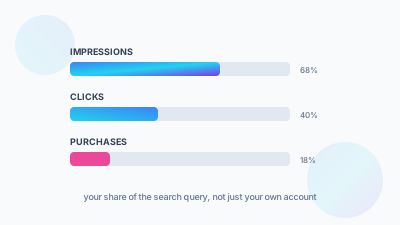
This method works but doesn't scale well past a handful of terms. For a full field, the Search Query Performance report inside Brand Analytics is the more reliable diagnostic, since it shows you real impression and click data tied to actual search terms, which tells you not just whether you're indexed but whether that indexing is translating into any visibility at all.
A Backend Terms Audit You Can Run Today
If you want to check your own listings right now, this is the same sequence we run during a client account audit:
- Pull the current backend search terms for your top five listings by revenue.
- Paste each field into a plain text editor and check for duplicate words using the one-word, one-instance rule above.
- Remove anything that repeats a word already present in your title or bullets.
- Remove any competitor brand names immediately, regardless of how long they've been there without issue.
- Confirm you're under 249 bytes, not 249 characters, especially if any of the text was ever copied from a spreadsheet or document.
- Use the freed-up space for two or three genuine synonym or use-case terms you were not previously covering.
Most listings we audit have never had this cleanup done even once since the product launched, which means the backend field has quietly accumulated years of copy-paste debris while doing a fraction of the indexing work it could be doing. Thirty minutes per listing is usually enough to fix it.
Frequently Asked Questions
It's 249 bytes per field, not 250 characters. For plain English text a character and a byte are usually the same thing, so the myth rarely bites US sellers writing in English. It becomes a real problem once you add accented characters, non-Latin scripts, or invisible formatting characters, which can consume two or more bytes each.
Your field almost certainly ran past 249 bytes. Copying keyword lists out of a spreadsheet or Google Doc brings along smart quotes, long dashes and non-breaking spaces that look identical to normal characters but eat extra bytes. Once the count runs out the field truncates and anything past that point is gone, not just unindexed.
Never. Competitor brand names do nothing for indexing and they cross into trademark territory, which makes them the single most common trigger for a listing suppression tied to an intellectual property complaint. Remove them from your listings today regardless of how long they've been sitting there without causing trouble.
No need. Amazon already indexes your title, bullets and description, so repeating those words in backend terms adds no weight and only burns byte budget. The same goes for your own brand name and ASIN, which are indexed automatically from your brand field and product identifiers. Spend that space on synonyms and use cases you don't cover anywhere else.