The report most sellers don't know exists
Ask sellers which report drives their keyword strategy and most will mention the Sponsored Products search term report or Amazon's keyword suggestion tools. Hardly anyone mentions Search Query Performance (SQP), which sits inside Brand Analytics. That is a real gap, because SQP is the only report Amazon publishes that shows your performance on a keyword relative to every other brand competing for the same search, instead of relative to your own account history.
You need Brand Registry to see it. If your brand is not enrolled yet, sort that out before anything else in this guide, because Brand Analytics data is not visible without it.
Once you are enrolled, you will find it under Brands > Brand Analytics in Seller Central (in Vendor Central, under Reports > Brand Analytics), then Search Query Performance. The report has a brand view, which covers all your ASINs together, and an ASIN view for individual products, and you can choose weekly, monthly or quarterly periods. Start with the brand view to find the queries that matter, then switch to the ASIN view to see which product is winning or losing them.
What makes SQP different from everything else in Seller Central
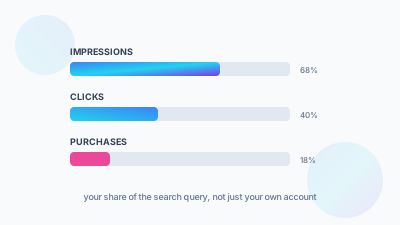
Most performance reports in Seller Central show your numbers on their own: your impressions, your clicks, your conversion rate. SQP shows your numbers as a share of the total market for a search query. For "stainless steel water bottle" it reports the total impressions for that search and what percentage of those impressions, clicks, cart adds and purchases went to your ASIN, compared with every competitor that also appeared. That turns "how did we do?" into "how did we do against what was available to win?", which is the whole point of the report.
The four funnel stages SQP tracks
SQP splits each search query into four stages in sequence, each reported as a total market number and as your share of it. Impressions shows how often the query returned results and how often your ASIN was among them. Clicks shows how often results were clicked and your share of those clicks. Cart Adds shows how often clicked products were added to cart, and your share. Purchases shows how often those turned into completed purchases, and your share.
Taken together, the four stages give you something no other report gives directly: your real click-through rate and conversion rate for a specific query, compared with the entire competitive set for that exact search. Your own account average cannot tell you whether that average is any good.
Next to the funnel columns, SQP also reports a search query volume figure, so you can see how big each query is, and median price columns, so you can compare your price with what shoppers clicked and bought. Price is often the hidden reason behind a weak click or purchase share.
Reading share, not just volume
On first opening SQP, most people sort by query volume and focus on the biggest numbers. That is a sensible first filter, but the diagnostic value is in the share columns. A high-volume query where you already hold a strong share is a query you are already winning. The opportunity lies in high-volume queries where your share is clearly below what your overall catalog performance would predict, because that gap is a specific problem you can work on.
Diagnosing problems: visibility vs conversion
The pattern across the stages tells you where in the funnel a query is breaking down, and the fix depends on which stage it is.
When impression share is high and click share is low, shoppers see you and pick someone else. That is a listing presentation problem: main image, title, price, star rating or badge (Amazon's Choice, Best Seller) compared with the other products showing for that query. Work on the listing before you touch ad spend.
When click share is high and cart-add or purchase share is low, shoppers click through to your listing and then fail to convert at the rate the clicks promised. That is a detail page problem: price perception, review content, the depth of the image gallery, or A+ Content that does not answer the objection costing you the sale. Sending more traffic to a page with this pattern buys more of the same poor result.
When impression share is low on a high-volume, relevant query, you barely show up for a search that clearly matters in your category. That is an indexing or relevance problem. The query is probably not well represented in your title, bullets or backend search terms, and bidding cannot fix a term you are not indexed for.
Most keyword prioritization uses volume alone, which treats a query you are winning the same as one you are invisible on, as long as the search volume is similar. SQP lets you rank by opportunity size, meaning volume multiplied by your visible gap, which is a much better way to decide where PPC and SEO effort goes next.
A worked example
Here is how the numbers work for one query in a month, using illustrative figures. Say SQP shows 5,000 total clicks and 400 total purchases across all brands for "insulated water bottle 32 oz". The market converts 8% of clicks (400 divided by 5,000). Your brand has an 8% click share, which is 400 clicks, but only a 3% purchase share, which is 12 purchases. Your conversion on that query is 3% (12 divided by 400), well under the market's 8%.
That is the second pattern above: shoppers are choosing to click you and then buying elsewhere. Check the median purchase price column first. If your price is well above it, that may be the whole answer. If price is in line, look at your reviews and image gallery against the products that are converting, and leave ad spend on that query where it is until conversion improves.
Finding keywords you're invisible on
Compare SQP with your own keyword research or competitor ASIN research to find high-volume queries in your category where your ASIN does not appear in the SQP report at all. Low share is one thing; complete absence is another. Absence usually means one of two things: the term is not anywhere in your indexed content, or a suppressed or restricted listing state is stopping you from showing for it. Either way it is a gap you can find and fix, and volume-only keyword tools will not reveal it, because they show what people search for without telling you whether you are eligible to appear.
A quick way to test eligibility is to search the exact phrase on Amazon with your brand name or ASIN added. If your product does not come up, it is probably not indexed for that phrase. Our guide to listings that are not indexed covers the usual causes.
Turning SQP into a PPC and SEO priority list
Once your top queries are grouped by diagnostic pattern, each group belongs to a different discipline. Visibility gaps (low impression share) go to the SEO and content backlog for title, bullet and backend search term updates. Click share gaps go to a creative and pricing review: main image, price positioning, badge eligibility. Detail page conversion gaps go to A+ Content, review generation and listing copy. Queries where you already hold a strong share at every stage are the safest place to concentrate PPC budget, because you already have proof that the full funnel converts for that search.
A simple priority sheet makes this easy to hand over. List each query with its volume, your share at each of the four stages, the stage where share drops most, the owner (SEO, creative, listing or PPC) and the date you will check it again. Sort by volume multiplied by the size of the drop, and work from the top.
A simple weekly SQP routine
Pull the report each week, sorted by query volume for your main category terms. Look for any query where your share falls sharply from one stage to the next; the point where it drops tells you which team owns the fix. Flag new high-volume queries that enter your top list, since search behaviour shifts with the seasons and a query that did not matter last quarter can matter a lot this one. Then go back to queries you have already worked on about a month after the change. SQP is the quickest way to confirm whether a listing or content change actually moved the share numbers.
Common mistakes with SQP
- Judging a change after one week. Weekly data on smaller queries is noisy, so look at several weeks or switch to the monthly view before deciding a fix worked.
- Reading brand-level share for a brand with many ASINs and missing that one product is winning while another is losing. Use the ASIN view for anything you plan to change.
- Chasing queries that are only loosely relevant. A low share on a query where your product is a poor match is not a gap worth closing.
- Treating SQP as an ads report. It covers all traffic, organic and paid together, so pair it with your search term report to see how much of your share comes from ads.
Frequently Asked Questions
It sits inside Brand Analytics, which requires Brand Registry enrollment to access. If your brand isn't enrolled yet, that's the prerequisite to solve first, because none of the Brand Analytics data is visible without it. Most sellers never open SQP, reaching for the Sponsored Products search term report or keyword suggestion tools instead.
Your share of the total market for a search query, alongside your own numbers. SQP reports four sequential stages, impressions, clicks, cart adds and purchases, as both a total market figure and the percentage that belonged to your ASIN. That lets you benchmark your click-through and conversion against the whole competitive set for that exact search.
Shoppers are seeing you and choosing someone else, which points to the listing's presentation more than to ad spend. Look at your main image, title, price, star rating and badge status compared with the competitors also appearing for that query. Fix the listing itself, since more bidding won't change what shoppers decide in the search results.
Concentrate PPC on queries where you already hold strong share across every stage, since you have proof the full funnel converts there. Send low impression share queries to your SEO backlog for title, bullet and backend term work. Click-share gaps go to creative and pricing. Detail-page conversion gaps go to A+ Content and reviews.
Yes. SQP counts all impressions, clicks, cart adds and purchases from a search query, whether they came from organic results or ads. To separate the two, compare it with your Sponsored Products search term report for the same period.
Weekly for your main category queries, so you catch shifts early, and monthly or quarterly when you want to judge whether a change worked. Smaller queries are noisy week to week, so use the longer periods before drawing conclusions on them.