What the IPI Score Actually Measures
The Inventory Performance Index is Amazon's single number for how efficiently you're using FBA storage space, scored from 0 to 1000. Most sellers first encounter it the way you'd encounter a credit score, as a number that shows up somewhere in a dashboard, trends up or down for reasons that aren't always obvious, and only becomes urgent once it crosses a threshold that triggers a penalty. That's a reasonable mental model as far as it goes, but it also leads sellers to treat IPI as a single lever, when it's actually a rollup of four separate components, and understanding each one matters because they don't move together and they don't get fixed by the same actions.
- Excess inventory. Units sitting in fulfillment centers well beyond what your recent sales velocity justifies. This is the classic "you ordered too much" problem, and it's the component most sellers associate with IPI even though it's only one of four.
- Sell-through rate. How quickly your inventory actually moves relative to what's on hand. Slow-moving stock drags this down even if it's not technically "excess" yet by Amazon's excess inventory threshold.
- Stranded inventory. Units sitting in FBA that aren't attached to an active, buyable listing. This happens more often than sellers realize, through listing errors, category gating issues, or suppressed listings that quietly stop being sellable while the inventory keeps sitting in a warehouse.
- In-stock rate. How often your active listings actually had inventory available to sell rather than showing as out of stock. This is the one component that rewards having enough inventory, which is precisely why it pulls in the opposite direction from the other three.
Drop below 400 and the consequences aren't abstract. You get FBA storage limits applied to your account, overage charges kick in on any inventory that exceeds those limits, and Amazon can apply ASIN-level restock caps on top of it. It's a real financial and operational penalty, not just a dashboard number to feel bad about.
The four components also don't carry equal weight in every account, and that's part of what makes IPI feel opaque. A seller running private label with a handful of SKUs might find that a single stranded listing tanks their score noticeably, because it's a larger share of their total inventory footprint. A seller with hundreds of SKUs might barely notice one stranded listing but get hammered by excess inventory sitting across a long tail of slow movers. Knowing which of the four components is actually dragging your score down, which you can see broken out in the Inventory Performance dashboard rather than just the headline number, changes what you should spend your time fixing first.
The Part Almost Everyone Gets Wrong
Here's the counterintuitive fact that trips up even experienced sellers: your IPI score is not what directly sets your account-level restock limit. It feels like it should be, because the two show up next to each other in Seller Central and both get worse together when your inventory management is a mess. But they're governed by separate mechanisms.
Your restock limit is set based on your past and forecasted sales, calculated per storage type, and then you're the one who allocates that total limit across your individual ASINs. Amazon is essentially asking: based on how fast you've actually been selling, how much inventory does it make sense to let you store in our network right now. It's a sales-velocity calculation, not a housekeeping-score calculation.
"Just improve your IPI score" is common advice in seller forums, and it's not wrong exactly, it's incomplete. A better IPI score keeps you out of storage limit and overage charge territory. It does not, by itself, raise the unit cap on how much you're allowed to restock if your underlying sales volume hasn't grown. Sellers who clean up their IPI and then wonder why their restock limit didn't budge are running into this exact gap.
This is why a seller can do everything "right" on paper, clear out excess stock, fix stranded listings, improve sell-through with better pricing, watch their IPI climb back into healthy territory, and still hit a wall where they simply cannot send in more units of a given SKU. If your trailing sales data doesn't support a higher limit, or if you already have roughly six months of that SKU's typical sales sitting in fulfillment centers, the cap holds regardless of how clean your IPI score looks.
Why This Hits Seasonal Sellers Hardest
The restock limit mechanism has a timing problem baked into it, and it's brutal for anyone with a seasonal sales curve. Restock limits are calculated from past and forecasted sales, which means they're heavily influenced by your trailing sales history. If you're building inventory in September and October ahead of a Q4 peak, your restock limit calculation is still largely reflecting your slower late summer sales, not the demand spike you're trying to prepare for.
The result is a seller who needs to bring in three or four times their normal monthly volume to be ready for peak season, running headfirst into a restock cap that was set based on data from the exact period when sales were at their lowest. You can have a pristine IPI score and still get capped, because the cap was never about your IPI in the first place.
That's the IPI threshold below which storage limits, overage charges, and restock caps start compounding on top of each other. Staying comfortably above it protects you from that specific penalty stack, but it's a floor to avoid, not a lever that pulls your restock ceiling higher.
Practical Tactics for Raising Your IPI Score
These are the levers that actually move the four IPI components:
- Run the Excess Inventory report in Seller Central and act on it directly rather than letting it sit as a reference document. Create removal or disposal orders for units that have genuinely stopped moving, particularly anything flagged as long-term storage risk.
- Fix stranded listings before you fix pricing. Check the Stranded Inventory page and resolve the underlying listing issue (missing details, suppressed listing, category restriction) so that inventory becomes sellable again instead of quietly aging in a warehouse.
- Use pricing and promotions to move slow sell-through SKUs deliberately, rather than waiting for organic velocity to catch up. A short, targeted price drop or a Lightning Deal on a slow mover often does more for your sell-through component in two weeks than months of passive selling.
- Set up automated replenishment alerts so your in-stock rate doesn't tank from simple understocking on your fast movers, since that's the one component where the fix is having enough inventory, not less.
How to Actually Grow Your Restock Limit
Since the restock limit runs on sales velocity and storage type rather than IPI, growing it requires a different kind of case than an IPI cleanup.
You can request a temporary restock limit increase through Seller Support, and the requests that succeed are the ones backed by a documented forecast rather than a general "I need more room" appeal. Pull your year-over-year sales data for the relevant period, attach any purchase orders or supplier commitments that show real demand backing the request, and specify the exact ASIN and unit increase you're asking for. A vague request gets a vague denial. A specific, evidenced one gives the reviewer something concrete to approve.
It's also worth checking whether reallocating your existing limit across ASINs solves the immediate problem before you escalate. Since you control how your total limit gets distributed across your catalog, a SKU that's slowing down can free up room for one that's about to spike, without needing Amazon to grant anything new.
Timing the request matters as much as the content of it. Filing the increase request the week before you need the inventory to arrive gives Seller Support no room to process it, and a rushed request tends to get a rushed, generic denial. Sellers who succeed with these requests tend to file them four to six weeks ahead of when they need the additional capacity live, which gives Amazon's review process time to work and gives you room to appeal or resubmit with additional documentation if the first attempt gets turned down.
A Seasonal Planning Framework to Avoid Getting Capped
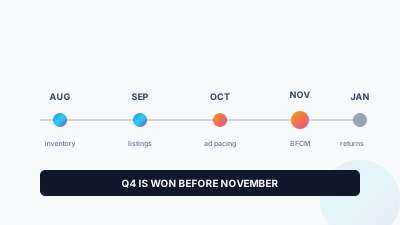
The sellers who avoid getting blindsided in Q4 treat restock limits as a forecasting problem that starts months earlier, not a support ticket they file in a panic in November.
- Map your restock limit trajectory against last year's actual peak volume in July or August, while there's still runway to act. If last year's trailing limit would have capped you before your real peak volume needs, assume the same gap exists this year unless you intervene.
- Start building sales velocity earlier than you think you need to, because the restock limit calculation is backward looking. A modest, earlier ramp in September helps your trailing data support a higher limit by the time you need to bring in serious peak volume.
- File limit increase requests in stages, not all at once in a single ask. A sequence of smaller, well-documented increase requests tends to move faster through Seller Support than one large jump that looks disconnected from your trailing sales pattern.
- Keep IPI healthy as a separate, parallel workstream so you're not fighting a storage limit and overage charges on top of a restock cap at the same time. The two problems compound each other operationally even though they're mechanically separate.
None of this makes the restock limit system less frustrating when you're staring at a cap that doesn't reflect what you know your actual demand will be. But treating IPI and restock limits as the two distinct systems they are, instead of assuming one score controls both, is what separates sellers who get ahead of Q4 from the ones who spend October filing emergency support cases.
One more habit worth building into your monthly routine, not just your pre-peak routine, is checking your restock limit alongside your IPI score rather than only checking IPI. Seller Central shows both, but because IPI is the one with a scary threshold attached and a visible penalty structure, it tends to get all the attention while the restock limit number sits quietly next to it, doing its own separate job of deciding how much inventory you're actually allowed to send in. Reviewing them together monthly, rather than discovering the gap between them during a peak season crunch, is the single easiest change most sellers can make to this part of their operation.
Frequently Asked Questions
It won't, and that gap catches out experienced sellers. Your restock limit is set from past and forecasted sales, calculated per storage type, not from your IPI score. A better IPI keeps you clear of storage limits and overage charges, but it does not raise the unit cap if your underlying sales volume hasn't grown.
FBA storage limits get applied to your account, overage charges kick in on any inventory above those limits, and Amazon can add ASIN-level restock caps on top. That's a real financial and operational penalty stack. Staying comfortably above 400 protects you from it, but treat it as a floor to avoid rather than a lever to pull.
Restock limits lean heavily on trailing sales history, so a limit calculated in September or October still reflects your slower late summer numbers rather than the peak you're building for. A seller who needs three or four times normal monthly volume runs into a cap set from their weakest period. IPI was never what set that cap.
Request a temporary increase through Seller Support backed by a documented forecast, not a general appeal for more room. Pull year-over-year sales data for the period, attach purchase orders or supplier commitments, and name the exact ASIN and unit increase. File four to six weeks ahead, and check first whether reallocating your existing limit across ASINs solves it.
Amazon's threshold has moved over time, so the practical target is to sit comfortably above the current one rather than near it. The score is evaluated at set checkpoints, and a dip at the wrong moment is what triggers restrictions. Treat a drift toward the threshold as an early warning to clear aged stock and fix stranded inventory.
IPI is the Inventory Performance Index, a rolling score Amazon calculates from excess inventory, sell-through rate, stranded inventory and in-stock rate. It is a measure of how efficiently you use FBA storage, not a measure of sales performance, which is why a fast-growing account can still carry a weak IPI.